Your OpenClaw Agent Was Compromised Three Sessions Ago. Here Is How to Find Out.
Production detection rules for CrowdStrike, Microsoft Defender for Endpoint, Cortex XDR, SentinelOne, and Splunk — plus YARA rules, Sigma rules, behavioral hunting queries, and forensic scripts mapped to the five MITRE ATLAS kill chains confirmed in the January 2026 disclosures.

Part 3 of 3 | ← Part 2: Production Security Architecture | ← Part 1: Attack Vectors and Verification
🔒 Update — April 2026: Cisco's DefenseClaw now provides structured enforcement events (
dc_block,dc_codeguard) that function as additional signal sources alongside theopenclaw-telemetryevents used in Tier 2 and Tier 3 queries below. If you have DefenseClaw deployed, see the addenda in the Tier 2 section for enhanced Splunk queries that join both event streams — the combination produces significantly fewer false negatives for Kill Chain 1 (Injection → RCE) scenarios.
If you stopped at Part 2, your deployment is hardened but invisible. You have no answer for:
When an attacker with a novel prompt injection technique bypasses openclaw-shield
Whether an infostealer already exfiltrated credentials before you rotated them
What your agent actually did in the 48 hours before you deployed behavioral monitoring
Whether SOUL.md has been modified since you last reviewed it
You hardened the gateway, isolated credentials, containerized the runtime, and deployed openclaw-shield. Your CISO's first question was not "did you harden it?" It was "how will you know when it's compromised?"
That question doesn't have a good answer in Parts 1 and 2. This post is the answer.
Parts 1 and 2 addressed the operator's problem: close the backdoors, architect defense-in-depth, assume breach at every layer. This post addresses the SOC team's problem: detect OpenClaw abuse before it becomes a breach, investigate when it does, and collect evidence your incident timeline will actually hold up.
This post is for: Security engineers, threat hunters, and SOC analysts who own detection coverage for endpoints running OpenClaw, Moltbot, or Clawdbot — including shadow deployments you didn't approve.
By the end, you'll have: Ready-to-deploy detection queries for CrowdStrike Falcon, Microsoft Defender for Endpoint, Palo Alto Cortex XDR, SentinelOne, and Splunk; a complete IOC set including YARA rules and Sigma rules; behavioral hunting queries mapped to the official OpenClaw MITRE ATLAS kill chains; a forensic evidence collection procedure; an honest account of where detection fails; and — if you have DefenseClaw deployed — enhanced Splunk queries that join DefenseClaw enforcement events with openclaw-telemetry for higher-confidence kill chain detection.
Environment Note: Detection queries target Windows endpoints (the most common enterprise deployment). Process and DNS queries work on macOS and Linux with EDR telemetry where noted. The telemetry source for behavioral hunting is openclaw-telemetry (covered in Part 2, Layer 6). Platform path variants use
~/.moltbot(current default),~/.clawdbot(legacy), and~/.openclaw(base installation).
Implementation time: Tier 1 discovery queries take under an hour to deploy on any supported EDR. Tier 2 behavioral hunting requires openclaw-telemetry from Part 2 — if you haven't deployed Layer 6 yet, complete that first. Tier 3 kill chain detection builds on Tier 2. Plan for a one-to-two day sprint if Part 2 is complete, or one to two weeks if you're starting fresh.
Table of Contents
Tier 1: Discovery Detection — Finding OpenClaw on Your Endpoints
Tier 2: Behavioral Hunting — Detecting Compromise in Progress
Tier 3: Kill Chain Detection — Mapping Attacks to ATLAS Tactics
Forensic Investigation: When Compromise Has Already Occurred
Why Detection Is Different for AI Agents
Framework mapping: NIST CSF DE.AE (Anomalies and Events), DE.CM (Continuous Monitoring), MITRE ATLAS AML.TA0003 (ML Attack Execution)
Traditional endpoint detection relies on a core assumption: malicious activity looks structurally different from legitimate activity. An attacker running mimikatz.exe leaves a process name. A C2 callback makes a network connection to an unusual domain. A ransomware deployment writes thousands of files in seconds.
OpenClaw breaks this assumption in a specific way.
When a compromised OpenClaw agent reads ~/.ssh/id_ed25519 and sends its contents to an attacker's email address, the process tree looks like this: openclaw.mjs spawns node, which calls the native file_read tool, which invokes the email_send tool. Every step is the agent behaving exactly as designed. The only difference from a legitimate request is the instruction that caused it — and that instruction lived inside a natural language string that the model decided to obey.
This is the detection problem in one sentence: you cannot reliably distinguish a malicious tool call from a legitimate one by looking at the tool call alone. You can only detect it through context — when it happened, what it accessed, what sequence it was part of, and whether a human authorized it.
Detection for AI agents therefore runs on three tiers. The first tier finds the software on your endpoints at all. The second tier looks for behavioral anomalies in what the agent does at runtime. The third tier maps observed activity to the specific kill chains documented in OpenClaw's official MITRE ATLAS threat model, letting you identify which attack scenario is in progress rather than just flagging suspicious behavior.
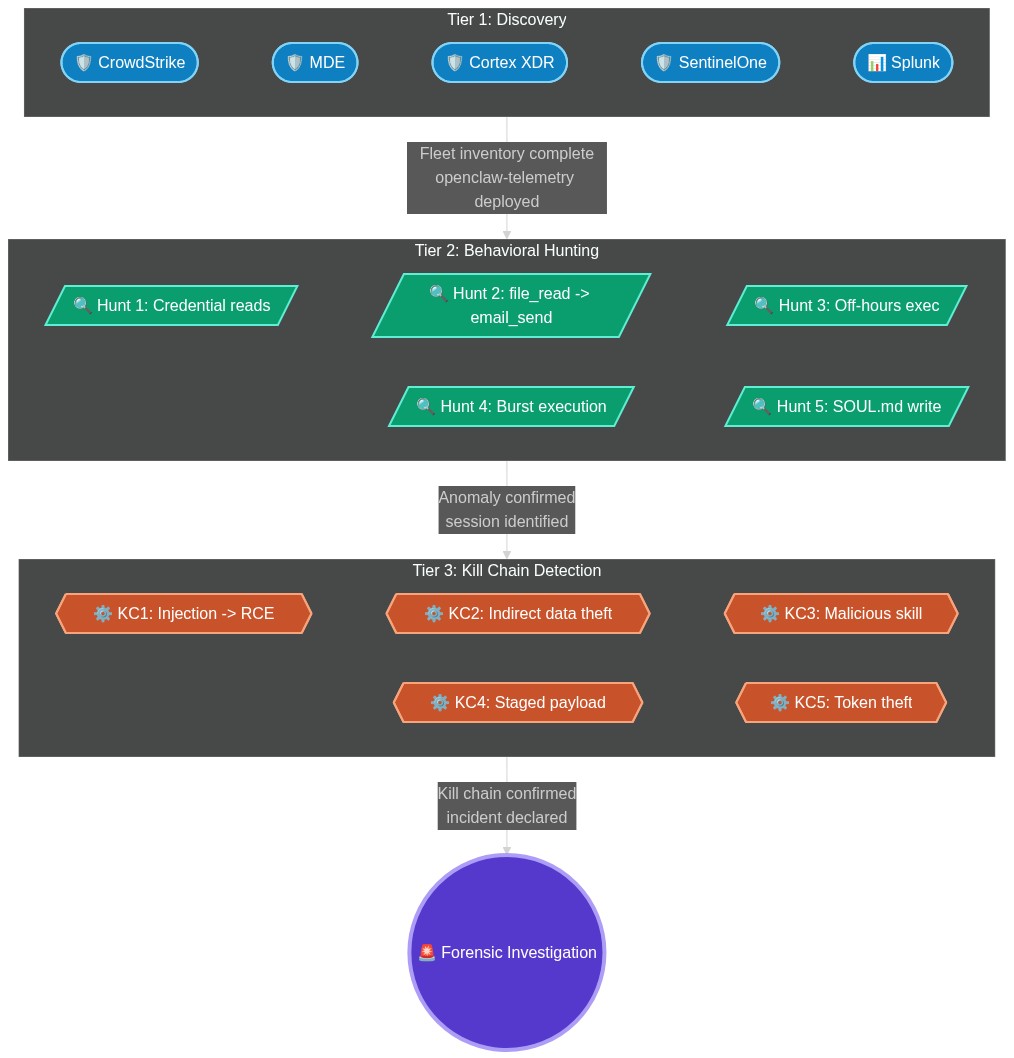
Figure 1: Three-tier detection model for OpenClaw deployments. Each tier builds on the previous — Tier 1 requires only EDR, Tier 2 requires openclaw-telemetry, and Tier 3 requires both.
What You're Actually Detecting
Before deploying any query, you need a clear picture of what normal OpenClaw activity looks like so your detections don't drown in false positives.
Normal process activity on a healthy installation:
openclaw.mjs                 -- Main agent process
openclaw-openclaw-gateway    -- Gateway/WebSocket multiplexer on 127.0.0.1:18789
openclaw-orchestrator        -- Task orchestration loop (Heartbeat)
node                         -- Runtime for skill execution
Normal network activity:
127.0.0.1:18789— Gateway listener (WebSocket + HTTP control UI)DNS queries to
openclaw.ai,molt.bot,clawd.bot,docs.openclaw.ai— Documentation and update checksDNS queries to
clawhub.openclaw.aiorauth.clawdhub.com— Skill marketplace
Normal filesystem activity:
Reads/writes to
~/.openclaw/,~/.moltbot/,~/.clawdbot/Access to
SOUL.md— The persistent identity file that injects into every agent session as behavioral context; think of it as the agent's long-term memory and self-descriptionAccess to
~/.openclaw/skills/— Installed skill modules
Anomalies are deviations from this baseline: access to paths outside the agent's configured working directories, outbound connections to non-OpenClaw infrastructure initiated by the agent process, modifications to SOUL.md outside the user's active session, and tool execution sequences that don't match typical user workflows.
Tier 1: Discovery Detection
Framework mapping: NIST CSF ID.AM-1 (Asset Management — physical devices and systems inventoried), DE.CM-7 (Monitoring for unauthorized activity)
Your first question is not whether OpenClaw is being abused. It's whether you know where it's running. An estimated 300,000–400,000 Clawdbot/OpenClaw deployments went up without IT approval. You cannot detect compromise on instances you don't know exist.
These queries find all OpenClaw installations and running instances across your managed fleet. Deploy them as standing scheduled queries or integrate into your MDM detection pipeline alongside openclaw-detect (covered in Part 2, Layer 7).
CrowdStrike Falcon
Full discovery query — process, DNS, and network in one:
(#event_simpleName=DnsRequest and (
    DomainName=/(openclaw\.ai|molt\.bot|clawd\.bot|docs\.(molt\.bot|clawd\.bot|openclaw\.ai)|moltbotai\.chat)/i
    or DomainName=*openclaw.ai* or DomainName=*molt.bot* or DomainName=*clawd.bot*
    or DomainName=*moltbotai.chat* or DomainName=*clawhub*
))

OR

(#event_simpleName=ProcessRollup2 and (
    CommandLine=/(molt\.bot|clawd\.bot|openclaw\.mjs|openclaw\s+(gateway|status|onboard)|openclaw-openclaw-gateway|openclaw-orchestrator|127\.0\.0\.1:18789|ws:\/\/127\.0\.0\.1:18789)/i
    or ImageFileName=/(openclaw|molty|clawd)(\.mjs|\.exe|$)/i
    or CommandLine=*molt.bot* or CommandLine=*clawd.bot*
    or CommandLine=*openclaw.mjs* or CommandLine=*openclaw gateway*
    or CommandLine=*openclaw-openclaw-gateway*
    or CommandLine=*127.0.0.1:18789* or CommandLine=*ws://127.0.0.1:18789*
    or ImageFileName=*openclaw* or ImageFileName=*molty* or ImageFileName=*clawd*
))

OR

((#event_simpleName=NetworkConnectIP4 or #event_simpleName=NetworkConnectIP6)
    and RemotePort=18789)

| table([@timestamp, ComputerName, UserName, #event_simpleName,
         DomainName, ImageFileName, CommandLine,
         RemoteAddress, RemotePort, ContextBaseFileName])
Microsoft Defender for Endpoint (KQL)
Full discovery query:
let ProcessIOCs =
DeviceProcessEvents
| where Timestamp > ago(30d)
| where ProcessCommandLine has "openclaw.mjs"
    or ProcessCommandLine has "openclaw-openclaw-gateway"
    or ProcessCommandLine has "openclaw-orchestrator"
    or ProcessCommandLine has "openclaw gateway"
    or ProcessCommandLine has "openclaw status"
    or ProcessCommandLine has "openclaw onboard"
    or ProcessCommandLine has "127.0.0.1:18789"
    or ProcessCommandLine has "ws://127.0.0.1:18789"
    or ProcessCommandLine has "molt.bot"
    or ProcessCommandLine has "clawd.bot"
| project Timestamp, DeviceName,
    AccountName = InitiatingProcessAccountName,
    EventType = "Process", FileName,
    CommandLine = ProcessCommandLine,
    RemotePort = 0, RemoteIP = "";

let NetworkDomainIOCs =
DeviceNetworkEvents
| where Timestamp > ago(30d)
| where RemoteUrl has "openclaw.ai"
    or RemoteUrl has "molt.bot"
    or RemoteUrl has "clawd.bot"
    or RemoteUrl has "clawhub"
    or RemoteUrl has "moltbotai.chat"
| project Timestamp, DeviceName,
    AccountName = InitiatingProcessAccountName,
    EventType = "Network_Domain",
    DomainOrUrl = RemoteUrl,
    FileName = InitiatingProcessFileName,
    CommandLine = InitiatingProcessCommandLine,
    RemotePort, RemoteIP;

let Port18789 =
DeviceNetworkEvents
| where Timestamp > ago(30d)
| where RemotePort == 18789
| project Timestamp, DeviceName,
    AccountName = InitiatingProcessAccountName,
    EventType = "Port18789",
    DomainOrUrl = RemoteUrl,
    FileName = InitiatingProcessFileName,
    CommandLine = InitiatingProcessCommandLine,
    RemotePort, RemoteIP;

union ProcessIOCs, NetworkDomainIOCs, Port18789
| order by Timestamp desc
| project Timestamp, DeviceName, AccountName,
    EventType, DomainOrUrl, FileName,
    CommandLine, RemoteIP
Palo Alto Cortex XDR
Full discovery query:
datamodel dataset = xdr_data
| filter
    xdm.event.description contains "openclaw.mjs"
    or xdm.event.description contains "openclaw-openclaw-gateway"
    or xdm.event.description contains "openclaw-orchestrator"
    or xdm.event.description contains "openclaw gateway"
    or xdm.event.description contains "127.0.0.1:18789"
    or xdm.event.description contains "ws://127.0.0.1:18789"
    or xdm.event.description contains "molt.bot"
    or xdm.event.description contains "clawd.bot"
    or xdm.source.process.executable.filename contains "openclaw"
    or xdm.source.process.executable.filename contains "molty"
    or xdm.source.process.executable.filename contains "clawd"
    or xdm.target.url contains "openclaw"
    or xdm.target.url contains "molt.bot"
    or xdm.target.url contains "clawd.bot"
    or xdm.target.domain contains "clawhub"
    or xdm.target.port = 18789
| fields _time,
    xdm.source.host.hostname,
    xdm.source.user.username,
    xdm.event.type,
    xdm.event.description,
    xdm.source.process.executable.filename,
    xdm.target.url,
    xdm.target.domain,
    xdm.target.ipv4,
    xdm.target.port
| sort desc _time
SentinelOne
Full discovery query:
src.process.cmdline contains (
    'openclaw.mjs',
    'openclaw-openclaw-gateway',
    'openclaw-orchestrator',
    'openclaw gateway',
    'openclaw status',
    'openclaw onboard',
    '127.0.0.1:18789',
    'ws://127.0.0.1:18789',
    'molt.bot',
    'clawd.bot'
)
or src.process.name contains ('openclaw', 'molty', 'clawd')
or src.process.image.path contains ('openclaw', 'molty', 'clawd')
or network.url contains (
    'openclaw.ai', 'molt.bot', 'clawd.bot',
    'docs.openclaw', 'docs.molt.bot', 'clawhub',
    'moltbotai.chat', 'moltbot', 'clawdbot', 'openclaw'
)
or dst.port.number = 18789
Splunk (Splunk Security Essentials / ES)
Full discovery query against the Endpoint data model:
| tstats count min(_time) as firstTime max(_time) as lastTime
    FROM datamodel=Endpoint.Processes
    WHERE
        Processes.process="*openclaw.mjs*" OR
        Processes.process="*openclaw-openclaw-gateway*" OR
        Processes.process="*openclaw gateway*" OR
        Processes.process="*openclaw status*" OR
        Processes.process="*openclaw onboard*" OR
        Processes.process="*127.0.0.1:18789*" OR
        Processes.process="*ws://127.0.0.1:18789*" OR
        Processes.process="*molt.bot*" OR
        Processes.process="*clawd.bot*"
    BY Processes.dest Processes.user Processes.process Processes.process_name
| `drop_dm_object_name(Processes)`
| `security_content_ctime(firstTime)`
| `security_content_ctime(lastTime)`
| eval risk_score=case(
    match(process, "0\.0\.0\.0:18789"), 100,
    match(process, "openclaw"), 60,
    true(), 40
  )
| sort - risk_score
| table firstTime lastTime dest user process process_name risk_score
→ All Tier 1 discovery queries — CrowdStrike, MDE (behavioral + kill chain), Cortex XDR, SentinelOne, Splunk
⚡ QUICK WIN — Deploy Fleet Discovery in the Next 10 Minutes
What it does: Finds every OpenClaw, Moltbot, or Clawdbot instance running on your managed fleet, including shadow installations that bypassed IT approval.
Why it matters: An estimated 300,000–400,000 deployments went up without security review. You cannot detect compromise on instances you don't know exist, and shadow deployments by definition have none of the Part 2 hardening in place.
Time estimate: 5–10 minutes with EDR console access.
Step 1 — Pick your platform and paste the query above into a new custom detection or saved search.
Step 2 — Set the schedule to run daily at minimum. Hourly is better given how fast new deployments appear.
Step 3 — Alert on any new result. Every OpenClaw process or domain contact that isn't in your approved asset inventory is a finding.
Step 4 — Cross-reference results with openclaw-detect (Part 2, Layer 7) for MDM-based coverage of endpoints without full EDR telemetry.
Expected safe output: Only the instances you approved appear, all bound to
127.0.0.1:18789.Red flags: Any result from a machine not in your asset inventory. Any process with
0.0.0.0:18789in the command line — that machine is or was internet-exposed.
Tier 2: Behavioral Hunting
Framework mapping: OWASP LLM01 (Prompt Injection — detection), NIST CSF DE.AE (Anomalies and Events), DE.CM-3 (Personnel activity monitored)
Knowing OpenClaw is running is table stakes. What your SOC actually needs is a way to distinguish a healthy deployment from a compromised one. The queries in this tier require openclaw-telemetry to be running (Part 2, Layer 6) — without it, you have process-level visibility only, which is insufficient for behavioral detection.
openclaw-telemetry writes events to ~/.openclaw/logs/telemetry.jsonl in this schema:
{
  "timestamp": "2026-02-18T06:34:12.441Z",
  "event_type": "tool_executed",
  "session_id": "sess_abc123",
  "tool_name": "file_read",
  "tool_args": {"path": "/home/user/.ssh/id_ed25519"},
  "tool_result_summary": "success",
  "chain_hash": "sha256:a1b2c3...",
  "prev_hash": "sha256:9z8y7x..."
}
When openclaw-telemetry forwards events to SIEM via CEF/syslog, the tool_args object is flattened into named CEF extension fields — tool_name, tool_path, recipients, session_id, etc. The KQL queries below reference these CEF extension names; the jq queries reference the raw JSONL field paths directly. If a field appears in the KQL but not in the schema above, it is a CEF-flattened variant of a nested tool_args key.
The following hunting queries work against this telemetry, either parsed locally with jq or after forwarding to your SIEM via CEF/syslog.
If you have DefenseClaw deployed: DefenseClaw emits its own structured event stream alongside openclaw-telemetry. The two event types most useful for behavioral hunting are:
// dc_block — DefenseClaw blocked a tool invocation or code execution
{
  "timestamp": "2026-04-01T14:22:03.112Z",
  "event_type": "dc_block",
  "session_id": "sess_xyz789",
  "trigger": "runtime_inspection",     // or "codeguard" | "supply_chain"
  "tool_name": "python_repl",
  "reason": "command_injection_pattern",
  "severity": "critical",
  "blocked_content_hash": "sha256:f3a..."
}

// dc_codeguard — CodeGuard scanned agent-generated code
{
  "timestamp": "2026-04-01T14:22:03.089Z",
  "event_type": "dc_codeguard",
  "session_id": "sess_xyz789",
  "tool_name": "exec",
  "findings": ["secrets_exposure", "command_injection"],
  "action_taken": "blocked"            // or "logged"
}
A dc_block event in the same session_id as a tool_executed anomaly from openclaw-telemetry is near-zero false positive evidence of an active attack — the behavioral anomaly detection fired and the enforcement layer blocked something. Join these two streams in your SIEM for high-confidence alerting.
Hunt 1: Credential Harvesting Sequence
This pattern detects the most common post-exploitation sequence — the agent reads a sensitive path shortly after receiving an inbound message from an external channel.
# Detect file reads targeting credential or key paths
cat ~/.openclaw/logs/telemetry.jsonl \
  | jq 'select(
      .event_type == "tool_executed"
      and .tool_name == "file_read"
      and (
        .tool_args.path | test(
          "\\.ssh|\\.aws|\\.moltbot|\\.clawdbot|\\.openclaw|id_rsa|id_ed25519|\\.bak|\\.env|credentials"
        )
      )
    )
    | {timestamp, session_id, tool_name, path: .tool_args.path}'
In Microsoft Sentinel (KQL) after CEF forwarding:
CommonSecurityLog
| where DeviceProduct == "openclaw-telemetry"
| where DeviceEventClassID == "tool_executed"
| extend tool_name = extract("tool_name=([^,]+)", 1, AdditionalExtensions)
| extend tool_path = extract("tool_path=([^,]+)", 1, AdditionalExtensions)
| where tool_name == "file_read"
    and tool_path matches regex @"(\.ssh|\.aws|\.moltbot|\.clawdbot|\.openclaw|id_rsa|id_ed25519|\.bak|\.env|credentials)"
| project TimeGenerated, DeviceName, SourceUserName,
    tool_name, tool_path
| order by TimeGenerated desc
Hunt 2: Exfiltration Sequence (file_read → email_send)
The Snyk-demonstrated email exfiltration attack leaves a distinctive tool sequence in logs: a file read of a sensitive path followed by an email send within the same session, within a short time window.
# Find sessions containing both file_read of sensitive paths
# and email_send within 60 seconds
cat ~/.openclaw/logs/telemetry.jsonl \
  | jq -s '
    group_by(.session_id)[]
    | . as $session
    | {
        session_id: $session[0].session_id,
        sensitive_reads: [
          $session[]
          | select(.tool_name == "file_read"
              and (.tool_args.path | test("\\.ssh|\\.aws|\\.bak|\\.env")))
        ],
        email_sends: [
          $session[]
          | select(.tool_name == "email_send")
        ]
      }
    | select(
        (.sensitive_reads | length) > 0
        and (.email_sends | length) > 0
      )
  '
KQL equivalent in Sentinel:
let sensitiveReads =
CommonSecurityLog
| where DeviceProduct == "openclaw-telemetry"
| where DeviceEventClassID == "tool_executed"
| extend tool_name = extract("tool_name=([^,]+)", 1, AdditionalExtensions)
| extend tool_path = extract("tool_path=([^,]+)", 1, AdditionalExtensions)
| extend session_id = extract("session_id=([^,]+)", 1, AdditionalExtensions)
| where tool_name == "file_read"
    and tool_path matches regex @"(\.ssh|\.aws|\.bak|\.env|credentials)"
| project TimeGenerated, DeviceName, session_id, tool_path;

let emailSends =
CommonSecurityLog
| where DeviceProduct == "openclaw-telemetry"
| where DeviceEventClassID == "tool_executed"
| extend tool_name = extract("tool_name=([^,]+)", 1, AdditionalExtensions)
| extend session_id = extract("session_id=([^,]+)", 1, AdditionalExtensions)
| extend recipients = extract("recipients=([^,]+)", 1, AdditionalExtensions)
| where tool_name == "email_send"
| project TimeGenerated, DeviceName, session_id, recipients;

sensitiveReads
| join kind=inner emailSends on session_id
| where abs(datetime_diff('second', TimeGenerated, TimeGenerated1)) < 60
| project
    ReadTime = TimeGenerated,
    SendTime = TimeGenerated1,
    DeviceName,
    session_id,
    sensitive_path = tool_path,
    email_recipients = recipients
| order by ReadTime desc
Hunt 2-DC: DefenseClaw-Enhanced Exfiltration Detection (Splunk)
If DefenseClaw is deployed alongside openclaw-telemetry, this Splunk query joins both event streams to produce a high-confidence exfiltration alert. A dc_block on a sensitive tool in the same session as a file read of a credential path is confirmed attack evidence — both the behavioral anomaly and the enforcement block are present.
index=openclaw_telemetry OR index=defenseclaw_events
| eval source_type=case(
    source=="openclaw-telemetry", "telemetry",
    source=="defenseclaw", "dc_event",
    true(), "unknown"
  )
| stats
    values(tool_name) as tools_used,
    values(event_type) as event_types,
    count(eval(event_type="dc_block")) as dc_blocks,
    count(eval(tool_name="file_read")) as credential_reads,
    count(eval(tool_name="email_send")) as email_sends
  by session_id, host
| where dc_blocks > 0 AND (credential_reads > 0 OR email_sends > 0)
| eval confidence=case(
    dc_blocks > 0 AND credential_reads > 0 AND email_sends > 0, "HIGH",
    dc_blocks > 0 AND credential_reads > 0, "MEDIUM",
    true(), "LOW"
  )
| sort - confidence
| table session_id, host, confidence, dc_blocks, credential_reads, email_sends, tools_used
Why this is different from Hunt 2: Hunt 2 requires both a sensitive file read and an email send in the same session to fire. This query fires on a dc_block event alone — meaning it catches cases where DefenseClaw stopped the exfiltration before email_send was ever invoked. The dc_block + credential_read combination is sufficient for a MEDIUM confidence alert.
Hunt 3: Off-Hours Execution
Tool execution when the user is not active is one of the cleanest behavioral signals. Prompt injection that triggers autonomous execution tends to happen whenever the attacker sends the payload — not necessarily during the user's working hours.
# Flag tool executions outside 8am-7pm local time on weekdays
cat ~/.openclaw/logs/telemetry.jsonl \
  | jq 'select(
      .event_type == "tool_executed"
      and (
        (.timestamp | strptime("%Y-%m-%dT%H:%M:%S.%fZ") | .tm_hour)
        < 8
        or
        (.timestamp | strptime("%Y-%m-%dT%H:%M:%S.%fZ") | .tm_hour)
        >= 19
      )
    )
    | {timestamp, tool_name, tool_args}'
KQL:
CommonSecurityLog
| where DeviceProduct == "openclaw-telemetry"
| where DeviceEventClassID == "tool_executed"
| extend HourOfDay = hourofday(TimeGenerated)
| extend DayOfWeek = dayofweek(TimeGenerated)
| extend tool_name = extract("tool_name=([^,]+)", 1, AdditionalExtensions)
| where HourOfDay < 8 or HourOfDay >= 19
    or DayOfWeek == 0d or DayOfWeek == 6d  // weekend
| where tool_name in ("exec", "shell", "python_repl",
    "file_read", "file_write", "email_send", "browser_action")
| project TimeGenerated, DeviceName, SourceUserName,
    tool_name, HourOfDay, DayOfWeek
| order by TimeGenerated desc
Hunt 4: Burst Tool Execution
Automated exploitation sequences run fast. More than ten tool calls within sixty seconds is unusual for normal human-driven usage and a reliable signal of either a prompt injection attack in progress or a runaway automation loop.
# Count tool calls per session per minute, flag bursts
cat ~/.openclaw/logs/telemetry.jsonl \
  | jq -s '
    [.[] | select(.event_type == "tool_executed")]
    | group_by(.session_id)[]
    | {
        session_id: .[0].session_id,
        total_calls: length,
        first_call: .[0].timestamp,
        last_call: .[-1].timestamp,
        tools_used: [.[].tool_name] | unique
      }
    | select(.total_calls > 10)
  '
KQL:
CommonSecurityLog
| where DeviceProduct == "openclaw-telemetry"
| where DeviceEventClassID == "tool_executed"
| extend session_id = extract("session_id=([^,]+)", 1, AdditionalExtensions)
| summarize
    tool_call_count = count(),
    tools_used = make_set(extract("tool_name=([^,]+)", 1, AdditionalExtensions)),
    first_call = min(TimeGenerated),
    last_call = max(TimeGenerated)
    by session_id, DeviceName, bin(TimeGenerated, 1m)
| where tool_call_count > 10
| project first_call, last_call, DeviceName,
    session_id, tool_call_count, tools_used
| order by tool_call_count desc
Hunt 5: SOUL.md Modification
SOUL.md is OpenClaw's persistent identity file — it injects into every session as behavioral context. Researchers demonstrated that attacker-controlled modifications to this file create persistence that survives restarts. Any write to SOUL.md outside of a user-initiated configuration change is a high-confidence indicator of compromise.
On Linux/macOS with inotify or auditd:
# Real-time monitoring (Linux with inotifywait)
inotifywait -m -e modify,create \
    ~/.openclaw/SOUL.md \
    ~/.moltbot/SOUL.md \
    ~/.clawdbot/SOUL.md 2>/dev/null

# Audit log review
ausearch -f SOUL.md --start yesterday --end now 2>/dev/null
KQL (via Defender for Endpoint file events):
DeviceFileEvents
| where Timestamp > ago(7d)
| where FileName == "SOUL.md"
    or FolderPath endswith "SOUL.md"
| where ActionType in ("FileModified", "FileCreated")
| where InitiatingProcessFileName !in~ ("openclaw.mjs", "node", "node.exe")
| project Timestamp, DeviceName, AccountName,
    InitiatingProcessFileName,
    InitiatingProcessCommandLine,
    FolderPath, ActionType
| order by Timestamp desc
Why this matters: Any process other than the OpenClaw gateway writing to SOUL.md — particularly a shell, Python interpreter, or download manager — is either a malicious skill executing its persistence payload or a direct filesystem attack. The KQL filter (!in~) excludes the two legitimate agent processes; everything else that modifies SOUL.md should be treated as a high-confidence finding until proven otherwise.
→ Behavioral hunting queries (KQL + Splunk SPL) → Sigma rules for all five behavioral hunts (platform-agnostic)
Tier 3: Kill Chain Detection
The official OpenClaw MITRE ATLAS threat model documents five critical attack kill chains. Each one has a distinct observable signature. The queries in this tier map to specific chains so your SOC can identify which scenario is in progress rather than responding to generic anomalies.
Kill Chain 1: Prompt Injection to Remote Code Execution
ATLAS chain: T-ACCESS-006 → T-EXEC-001 → T-EVADE-003 → T-EXEC-004 → T-IMPACT-001
Gain channel access, inject prompt, manipulate confirmation dialog, bypass exec approval, execute commands on host.
The behavioral signature is a high-risk tool (exec, shell, python_repl) executed shortly after an inbound message from an external channel (email, Slack, Twitter/X), with no corresponding user interaction event.
// Defender for Endpoint — detect exec/shell tool within 5 min of inbound message
let HighRiskToolExec =
CommonSecurityLog
| where DeviceProduct == "openclaw-telemetry"
| where DeviceEventClassID == "tool_executed"
| extend tool_name = extract("tool_name=([^,]+)", 1, AdditionalExtensions)
| extend session_id = extract("session_id=([^,]+)", 1, AdditionalExtensions)
| where tool_name in ("exec", "shell", "python_repl")
| project ExecTime = TimeGenerated, DeviceName, session_id, tool_name;

let InboundMessages =
CommonSecurityLog
| where DeviceProduct == "openclaw-telemetry"
| where DeviceEventClassID == "message_received"
| extend channel = extract("channel=([^,]+)", 1, AdditionalExtensions)
| extend session_id = extract("session_id=([^,]+)", 1, AdditionalExtensions)
| where channel in ("email", "slack", "twitter", "discord", "whatsapp", "telegram")
| project MsgTime = TimeGenerated, DeviceName, session_id, channel;

HighRiskToolExec
| join kind=inner InboundMessages on session_id
| where ExecTime > MsgTime
    and datetime_diff('second', ExecTime, MsgTime) < 300
| project MsgTime, ExecTime, DeviceName, session_id, channel, tool_name
| extend SecondsToExec = datetime_diff('second', ExecTime, MsgTime)
| order by ExecTime desc
Kill Chain 2: Indirect Injection Data Theft
ATLAS chain: T-EXEC-002 → T-DISC-004 → T-EXFIL-001
Poison fetched content (a webpage, document, or feed item), let the agent enumerate the environment, exfiltrate via web_fetch or HTTP tool.
This chain is harder to detect because web_fetch is a normal tool. The signal is environment enumeration (T-DISC-004) — the agent reading system paths, user configuration, or environment variables — immediately after a web_fetch call.
# Detect web_fetch immediately followed by filesystem enumeration
# within the same session
cat ~/.openclaw/logs/telemetry.jsonl \
  | jq -s '
    [.[] | select(.event_type == "tool_executed")]
    | group_by(.session_id)[]
    | to_entries
    | . as $events
    | $events[]
    | select(.value.tool_name == "web_fetch")
    | . as $fetch
    | \(events[(\)fetch.key + 1):($fetch.key + 4)][]
    | select(
        .value.tool_name == "file_read"
        or .value.tool_name == "shell"
        or (.value.tool_name == "exec"
            and (.value.tool_args.command
                | test("env|printenv|ls -la|cat ~|whoami|id")))
      )
    | {
        fetch_at: $fetch.value.timestamp,
        fetch_url: $fetch.value.tool_args.url,
        followed_by: .value.tool_name,
        followed_args: .value.tool_args
      }
  '
KQL equivalent in Sentinel:
let WebFetches =
CommonSecurityLog
| where DeviceProduct == "openclaw-telemetry"
| where DeviceEventClassID == "tool_executed"
| extend tool_name = extract("tool_name=([^,]+)", 1, AdditionalExtensions)
| extend session_id = extract("session_id=([^,]+)", 1, AdditionalExtensions)
| extend tool_url = extract("tool_url=([^,]+)", 1, AdditionalExtensions)
| where tool_name == "web_fetch"
| project FetchTime = TimeGenerated, DeviceName, session_id, tool_url;

let EnvEnumeration =
CommonSecurityLog
| where DeviceProduct == "openclaw-telemetry"
| where DeviceEventClassID == "tool_executed"
| extend tool_name = extract("tool_name=([^,]+)", 1, AdditionalExtensions)
| extend session_id = extract("session_id=([^,]+)", 1, AdditionalExtensions)
| extend tool_path = extract("tool_path=([^,]+)", 1, AdditionalExtensions)
| extend tool_cmd = extract("tool_cmd=([^,]+)", 1, AdditionalExtensions)
| where (tool_name == "file_read")
    or (tool_name in ("exec", "shell")
        and tool_cmd matches regex @"(env|printenv|ls -la|cat ~|whoami|id)")
| project EnumTime = TimeGenerated, DeviceName, session_id,
    tool_name, tool_path, tool_cmd;

WebFetches
| join kind=inner EnvEnumeration on session_id
| where EnumTime > FetchTime
    and datetime_diff('second', EnumTime, FetchTime) < 120
| project FetchTime, EnumTime, DeviceName, session_id,
    fetched_url = tool_url,
    follow_tool = tool_name,
    follow_detail = coalesce(tool_path, tool_cmd)
| order by FetchTime desc
Kill Chain 3: Malicious Skill Full Kill Chain
ATLAS chain: T-RECON-003 → T-EVADE-001 → T-ACCESS-004 → T-EXEC-005 → T-PERSIST-001 → T-EXFIL-003
The attacker researches ClawHub, publishes an evasive skill, the user installs it, it executes, establishes persistence, and harvests credentials.
The detection opportunity for defenders is at T-EXEC-005 and T-PERSIST-001 — a skill executing unexpected system calls, or SOUL.md being modified by a skill process.
Defender for Endpoint — detect skill process spawning system-level child processes:
DeviceProcessEvents
| where Timestamp > ago(30d)
// Skills run as child processes of openclaw/node
| where InitiatingProcessFileName in~ ("openclaw.mjs", "node.exe", "node")
    or InitiatingProcessCommandLine has "openclaw"
// Flag when the child process is a shell or system utility
| where FileName in~ ("cmd.exe", "powershell.exe", "bash", "sh",
    "python.exe", "python3", "curl.exe", "curl", "wget",
    "certutil.exe", "bitsadmin.exe", "regsvr32.exe")
| project Timestamp, DeviceName,
    AccountName = InitiatingProcessAccountName,
    ParentProcess = InitiatingProcessFileName,
    ChildProcess = FileName,
    ChildCommandLine = ProcessCommandLine
| order by Timestamp desc
Kill Chain 4: Supply Chain Staged Payload
ATLAS chain: T-ACCESS-005 → T-EVADE-004 → T-EXEC-005 → T-PERSIST-002 → T-EXFIL-004
A compromised skill publisher pushes an update. The update appears benign on first run — it retrieves the actual payload from a remote source on the second execution. The skill manifest hash comparison from Part 2, Layer 5 catches tampering in storage. This query catches the runtime retrieval.
# Detect skill processes making unexpected outbound HTTP calls
# to non-OpenClaw infrastructure
cat ~/.openclaw/logs/telemetry.jsonl \
  | jq 'select(
      .event_type == "tool_executed"
      and .tool_name == "web_fetch"
      and (
        .tool_args.url
        | test("openclaw\\.ai|molt\\.bot|clawd\\.bot|anthropic\\.com|openai\\.com")
        | not
      )
    )
    | {timestamp, session_id, url: .tool_args.url}'
KQL equivalent in Sentinel:
CommonSecurityLog
| where DeviceProduct == "openclaw-telemetry"
| where DeviceEventClassID == "tool_executed"
| extend tool_name = extract("tool_name=([^,]+)", 1, AdditionalExtensions)
| extend tool_url = extract("tool_url=([^,]+)", 1, AdditionalExtensions)
| extend session_id = extract("session_id=([^,]+)", 1, AdditionalExtensions)
| extend skill_context = extract("skill_name=([^,]+)", 1, AdditionalExtensions)
| where tool_name == "web_fetch"
| where isnotempty(skill_context)  // only flag fetches within a skill execution context
| where tool_url !has "openclaw.ai"
    and tool_url !has "molt.bot"
    and tool_url !has "clawd.bot"
    and tool_url !has "anthropic.com"
    and tool_url !has "openai.com"
| project TimeGenerated, DeviceName, session_id, skill_context, tool_url
| order by TimeGenerated desc
Any web_fetch to a domain not on your known-good list that is initiated from within a skill execution context is a candidate for staged payload retrieval.
Kill Chain 5: Token Theft Persistent Access
ATLAS chain: T-ACCESS-003 → T-PERSIST-004 → T-DISC-002 → T-EXFIL-002
An attacker steals authentication tokens, uses them to maintain persistent Gateway access, extracts session data including conversation transcripts, and exfiltrates via messaging integrations.
The detection signal for this chain is multiple session starts from the same token but different source characteristics — timing, message patterns, or tool usage that doesn't match the legitimate user's behavioral baseline.
// Detect token reuse across sessions with anomalous timing gaps
CommonSecurityLog
| where DeviceProduct == "openclaw-telemetry"
| where DeviceEventClassID == "session_start"
| extend token_hash = extract("token_hash=([^,]+)", 1, AdditionalExtensions)
| extend source_channel = extract("channel=([^,]+)", 1, AdditionalExtensions)
| summarize
    session_count = count(),
    channels = make_set(source_channel),
    first_seen = min(TimeGenerated),
    last_seen = max(TimeGenerated)
    by token_hash, DeviceName
| where session_count > 5
    and array_length(channels) > 2
| order by session_count desc
→ Kill chain detection queries (MDE KQL) → MITRE ATLAS full kill chain mapping
Forensic Investigation
Framework mapping: NIST CSF RS.AN (Analysis), RS.EV (Evidence), MITRE ATLAS AML.TA0009 (ML Exfiltration — evidence of)
When you've confirmed compromise — or when you're responding to an incident and need to build a timeline — this is the evidence you need to collect and the order to collect it in.
Before doing anything else, preserve logs. Once you stop the agent, log rotation or the next restart may overwrite evidence.
Phase 0: Preserve Evidence (Run Before Containment)
INCIDENT_DIR=~/incident-$(date +%Y%m%d-%H%M%S)
mkdir -p "$INCIDENT_DIR"

# Preserve all agent logs (telemetry, tool execution, standard)
cp -r ~/.openclaw/logs/ "$INCIDENT_DIR/openclaw-logs/" 2>/dev/null
cp -r ~/.moltbot/logs/ "$INCIDENT_DIR/moltbot-logs/" 2>/dev/null
cp -r ~/.clawdbot/ "$INCIDENT_DIR/clawdbot-config-backup/" 2>/dev/null

# Preserve SOUL.md and skill manifests (potential persistence artifacts)
cp ~/.openclaw/SOUL.md "$INCIDENT_DIR/SOUL.md.evidence" 2>/dev/null
cp ~/.moltbot/SOUL.md "$INCIDENT_DIR/SOUL.md.evidence" 2>/dev/null

# Capture current network state (active connections when compromise detected)
ss -tnap > "$INCIDENT_DIR/network-state.txt" 2>/dev/null
lsof -nP -iTCP -sTCP:ESTABLISHED >> "$INCIDENT_DIR/network-state.txt" 2>/dev/null

# Capture running processes (agent process tree)
ps auxf > "$INCIDENT_DIR/process-tree.txt" 2>/dev/null

# Check backup credential files (persistence of old credentials)
find ~/ \( -path "*/.moltbot/*" -o -path "*/.clawdbot/*" -o -path "*/.openclaw/*" \) \
    -name "*.bak*" -type f 2>/dev/null > "$INCIDENT_DIR/backup-files-found.txt"

# Verify telemetry hash chain integrity
# (broken chain = attacker tampered with logs)
tail -100 ~/.openclaw/logs/telemetry.jsonl \
    | jq -r '[.chain_hash, .prev_hash] | @csv' \
    > "$INCIDENT_DIR/hash-chain.csv" 2>/dev/null

echo "Evidence preserved to: $INCIDENT_DIR"
echo "Do NOT stop the agent process until evidence is secured."
Phase 1: Containment
# Stop agent and block outbound network
systemctl stop moltbot 2>/dev/null
systemctl stop openclaw 2>/dev/null
docker stop clawdbot 2>/dev/null

# Block outbound network from the agent user account (Linux)
sudo iptables -A OUTPUT -m owner --uid-owner "$USER" -j DROP
Phase 2: Build the Attack Timeline
The chain_hash field in openclaw-telemetry links every event to the previous one. If any hash fails to match the previous event's hash, log tampering occurred — note the break point, because everything before it is reliable evidence and everything after may have been modified.
# Build chronological timeline of all tool executions
cat "$INCIDENT_DIR/openclaw-logs/telemetry.jsonl" \
  | jq -r 'select(.event_type == "tool_executed")
    | [.timestamp, .tool_name, (.tool_args | tostring)] | @tsv' \
  | sort > "$INCIDENT_DIR/tool-execution-timeline.tsv"

# Identify first anomalous event
cat "$INCIDENT_DIR/openclaw-logs/telemetry.jsonl" \
  | jq 'select(
      .event_type == "tool_executed"
      and .tool_name == "file_read"
      and (.tool_args.path | test("\\.ssh|\\.aws|\\.bak|credentials"))
    )
    | {timestamp, path: .tool_args.path}' \
  | head -1
Phase 3: Determine Scope of Credential Exposure
The forensic question your CISO will ask is "what did the attacker get?" Work through this systematically:
# Enumerate what credential files existed and when they were last accessed
stat ~/.moltbot/moltbot.json 2>/dev/null
stat ~/.clawdbot/clawdbot.json 2>/dev/null

# Check OS audit log for Keychain access events (macOS)
log show --predicate 'eventMessage contains "Clawdbot"' \
    --start "2026-01-27 00:00:00" 2>/dev/null \
    | grep -i "keychain\|secret\|api_key"

# Linux: check Secret Service access audit
journalctl --since="2026-01-27" | grep -i "secret service\|clawdbot\|openclaw" 2>/dev/null

# Review email_send tool calls for external recipients
cat "$INCIDENT_DIR/openclaw-logs/telemetry.jsonl" \
  | jq 'select(
      .event_type == "tool_executed"
      and .tool_name == "email_send"
    )
    | {timestamp, recipients: .tool_args.recipients, subject: .tool_args.subject}'
Phase 4: Assess Skill Integrity
If the compromise came via a malicious skill, identify which skill, whether it modified SOUL.md, and whether it created any persistence mechanisms.
# Compare current skill hashes against your baseline manifest
python3 skill_manifest.py \
    --compare "$INCIDENT_DIR/../manifest_baseline.json" \
    --output "$INCIDENT_DIR/manifest-at-incident.json"

# Check SOUL.md for injected instructions
# Look for: scheduled task references, external URLs,
# unusual behavioral directives, base64-encoded content
cat "$INCIDENT_DIR/SOUL.md.evidence" | grep -E \
    "(schedule|cron|http|base64|eval|exec|ignore.*previous|override)"

# Check for scheduled tasks created by the agent (Linux)
crontab -l 2>/dev/null | grep -v "^#"
systemctl list-units --type=service | grep -i "openclaw\|moltbot\|clawd"
→ Automated forensic collection scripts — collect_evidence.sh, build_timeline.sh, check_credential_scope.sh, verify_hash_chain.py
IOC Reference
Framework mapping: NIST CSF ID.RA (Risk Assessment), DE.CM-1 (Network monitored for attack events)
This is the complete IOC set for OpenClaw, Moltbot, and Clawdbot deployments. Use these in your SIEM blocklists, EDR custom IOC feeds, and threat intelligence platforms.
Network
Domains
openclaw[.]ai
docs.openclaw[.]ai
clawhub.openclaw[.]ai
molt[.]bot
docs.molt[.]bot
clawd[.]bot
docs.clawd[.]bot
moltbotai[.]chat
moltbook[.]ai
clawhub[.]ai
auth.clawdhub[.]com
Ports
18789/tcp -- OpenClaw Gateway (WebSocket + HTTP control panel)
URIs
127.0.0.1:18789
ws://127.0.0.1:18789
0.0.0.0:18789   -- CRITICAL: internet-exposed variant
Process
Command line patterns
openclaw gateway
openclaw status
openclaw onboard
openclaw doctor
openclaw security audit
openclaw orchestrator
openclaw-openclaw-gateway
openclaw-orchestrator
openclaw.mjs
molt.bot
clawd.bot
127.0.0.1:18789
ws://127.0.0.1:18789
Filesystem
Paths and files
~/.openclaw/
~/.moltbot/
~/.clawdbot/
SOUL.md                         -- Persistent identity file (monitor for writes)
Skill.md                        -- Skill definition files
entry.js                        -- Skill entry point
openclaw.mjs                    -- Main agent process
~/.moltbot/moltbot.json         -- Primary credential store
~/.moltbot/moltbot.json.bak*    -- Backup credential files (spans .bak through .bak.4)
~/.clawdbot/clawdbot.json.bak*  -- Legacy Clawdbot backup files
%USERPROFILE%\openclaw\         -- Windows installation path
%USERPROFILE%\.local\bin\openclaw.cmd  -- Windows CLI binary
Infostealer Target Patterns (Active as of February 2026)
Hudson Rock's telemetry confirmed that RedLine, Lumma, and Vidar adapted to explicitly enumerate these patterns within 72 hours of the January 2026 disclosures:
*/.moltbot/*.bak*
*/.clawdbot/*.bak*
*/.openclaw/*.bak*
~/.moltbot/moltbot.json
~/.clawdbot/clawdbot.json
YARA Rules
Four YARA rules are available in the repository for scanning disk images, EDR memory dumps, and SIEM-ingested file telemetry. The rule below detects backup credential files containing API keys — the pattern that remained exploitable for 35 days after users believed they had rotated:
rule OpenClaw_Backup_Credential_File {
    meta:
        description = "Detects OpenClaw/Moltbot/Clawdbot backup credential files containing API keys"
        author      = "openclaw-security-playbook"
        date        = "2026-02-20"
        severity    = "high"
    strings:
        $anthropic = "\"anthropicKey\"" ascii
        $openai    = "\"openaiKey\""    ascii
        $bak_hint  = ".json.bak"        ascii
        $path1     = ".moltbot"         ascii
        $path2     = ".clawdbot"        ascii
    condition:
        (\(anthropic or \)openai) and (\(bak_hint or \)path1 or $path2)
}
The other three rules cover: OpenClaw process artifacts on disk (OpenClaw_Process_Presence), suspicious content patterns in SOUL.md that indicate prompt injection persistence (OpenClaw_SOUL_Modification), and skill scripts making unexpected outbound HTTP calls indicative of staged payload retrieval (OpenClaw_Staged_Payload_Fetch).
Sigma Rules
Four platform-agnostic Sigma rules are available for conversion to any supported SIEM using pySigma. The rule below detects SOUL.md modifications by non-agent processes — the persistence mechanism that Hunt 5 monitors at runtime:
title: OpenClaw SOUL.md Modified by Non-Agent Process
id: d4e5f6a7-b8c9-0123-bcde-f45678901234
status: experimental
description: >
  Detects modification of SOUL.md by a process other than openclaw.mjs or node.
  SOUL.md injects into every agent session; attacker-controlled modifications
  create persistence that survives restarts. MITRE ATLAS T-PERSIST-001.
references:
  - https://cloudsecops.hashnode.dev/openclaw-detecting-compromise
  - https://trust.openclaw.ai/trust/threatmodel
author: openclaw-security-playbook
date: 2026/02/20
tags:
  - attack.persistence
  - attack.t1546
  - atlas.t-persist-001
logsource:
  category: file_event
  product: windows
detection:
  selection:
    TargetFilename|endswith: '\SOUL.md'
    EventType: 'FileModified'
  filter_legitimate:
    Image|endswith:
      - '\openclaw.mjs'
      - '\node.exe'
      - '\node'
  condition: selection and not filter_legitimate
falsepositives:
  - User manually editing SOUL.md in a text editor (document and suppress per user)
level: high
The other three rules cover: gateway port exposure (openclaw-gateway-exposure.yml), credential path reads (openclaw-credential-harvest.yml), and skill child process spawning (openclaw-skill-child-process.yml).
→ All four Sigma rules → Flat IOC file (importable to SIEM blocklists)
Detection Gaps: Where This Falls Short
The detection content in this post has real limits and you should understand them before presenting it to your team as coverage.
Prompt injection is not reliably detectable in real time. The attack lands inside a natural language string. By the time the tool execution happens - which is what Tier 2 detects - the injection has already succeeded. You're detecting the consequence, not the event. The practical implication is that your detection posture for prompt injection is: catch the execution, not the instruction.
Benchmarks also reveal that tool-abuse detection is the biggest blind spot: even the best detectors block only around 9–17 % of unauthorized tool calls. This highlights the need for runtime enforcement and monitoring beyond static injection detection.
What DefenseClaw closes (April 2026): If deployed, DefenseClaw's enforcement events close two of the most significant detection gaps:
Agent-generated code execution gap: Hunt 3 and Kill Chain 1 queries detect off-hours
execcalls but cannot inspect the content of what gets executed. DefenseClaw's CodeGuard scans the generated code before execution and emits adc_codeguardevent with findings. This surfaces command injection and secrets-harvesting code that would otherwise execute silently and only be visible via process-level EDR telemetry.Supply chain gap (pre-install): The manifest drift detection in Part 2 Layer 5 detects tampering after install. DefenseClaw catches malicious skills before install and emits a
dc_blockevent with severity and reason. Addindex=defenseclaw_events event_type=dc_block trigger=supply_chain severity=criticalas a standing Splunk alert — any result is a high-priority finding.
What DefenseClaw does not close: Single-session, low-tool-count prompt injection attacks that complete before any rate-limit or burst threshold fires. If an attacker sends one carefully crafted email that results in exactly one file_read of ~/.ssh/id_ed25519 and one email_send, and both complete in under 30 seconds, none of the Tier 2 queries and no DefenseClaw pattern will fire unless the agent-generated code path is involved. The only reliable mitigation for this scenario is disabling the email_send tool entirely or requiring human confirmation (Part 2, Layer 4).
Telemetry-dependent queries require Part 2 to be complete. Tier 2 and Tier 3 behavioral hunting only work if openclaw-telemetry is deployed and forwarding to your SIEM. If you're deploying these detections against existing endpoints that never had telemetry configured, you have process-level visibility only. That means Tier 1 discovery queries are your primary tool and your behavioral gap is significant.
The Staged Payload kill chain (T-EVADE-004) is difficult to detect without a known-good domain allowlist. The queries in Kill Chain 4 work well if you've taken the time to build and maintain a list of expected outbound domains for your deployment. Without it, web_fetch calls look identical whether they're retrieving a user-requested webpage or downloading a second-stage payload.
Hash chain integrity tells you whether logs were tampered, not what was deleted. If an attacker gained sufficient access to delete log files entirely before you collected them, the chain-hash verification produces no output. Collection timing matters — the Phase 0 evidence preservation script should run as an automated response action, not a manual step.
These queries assume the attacker has not disabled openclaw-telemetry. An attacker with sufficient access to modify the agent configuration can disable the telemetry plugin. Detecting that event requires a separate monitor on the OpenClaw configuration file itself, which the SOUL.md monitoring query in Tier 2 partially covers.
Pair this detection content with your EDR's out-of-band process and network telemetry, and treat missing telemetry on an endpoint as a finding in its own right.
Real-Time Protection on the Moltbook Social Network
Researchers found that about 506 posts (≈ 2.6 % of those analysed) on Moltbook—a closed social network for AI agents—contained malicious instructions attempting prompt injection or coercing agents to violate policy. The Moltbook-Agent-Guard library scans each post in memory and blocks it if an anomaly is detected, preventing the language model from processing it. It detects jailbreaks, credential theft, data exfiltration, prompt extraction, role hijacking and encoded payloads, providing immediate protection in chat-like environments. Integrate this guard when your agents consume messages from external users.
Production Detection Checklist
Before signing off that detection coverage is in place for your fleet:
Tier 1: Discovery
[ ] CrowdStrike/MDE/Cortex/SentinelOne/Splunk discovery query deployed as a scheduled rule (run daily minimum)
[ ] Port 18789 network rule active in your SIEM and EDR
[ ] DNS IOCs (
openclaw.ai,molt.bot,clawd.bot,clawhub.*,moltbotai.chat) in your DNS monitoring blocklist or alert policy[ ] openclaw-detect deployed via MDM for shadow installation coverage (see Part 2, Layer 7)
[ ] Baseline of approved OpenClaw installations documented in asset inventory
Tier 2: Behavioral Hunting
[ ] openclaw-telemetry deployed on all OpenClaw endpoints (see Part 2, Layer 6)
[ ] SIEM CEF/syslog forwarding configured and verified with a test event
[ ] Credential path read alert active (Hunt 1)
[ ]
file_read→email_sendsequence alert active (Hunt 2)[ ] Off-hours execution alert active (Hunt 3)
[ ] Burst tool execution alert active (Hunt 4)
[ ] SOUL.md modification alert active (Hunt 5) — this one is high priority; deploy it first
[ ] Alert tuning completed based on 7-day baseline of normal activity
[ ] (If DefenseClaw deployed)
dc_blockalert active fortrigger=runtime_inspectionandtrigger=codeguardevents[ ] (If DefenseClaw deployed)
dc_block+credential_readjoin query deployed (Hunt 2-DC above)[ ] (If DefenseClaw deployed) DefenseClaw supply chain block alert active:
event_type=dc_block trigger=supply_chain severity=critical
Tier 3: Kill Chain Coverage
[ ] Inbound message → high-risk tool execution alert deployed (Kill Chain 1)
[ ]
web_fetch→ environment enumeration sequence alert deployed (Kill Chain 2)[ ] Skill process spawning shell child process alert deployed (Kill Chain 3)
[ ] Domain allowlist built for
web_fetchmonitoring (Kill Chains 2 and 4)[ ] Token reuse anomaly detection active (Kill Chain 5)
Forensics Readiness
[ ] Evidence preservation script staged on each OpenClaw endpoint, executable as a response action
[ ] Log retention period sufficient for forensic investigation (90 days minimum)
[ ] Incident response playbook from Part 2 reviewed by SOC team with agent-specific steps understood
[ ] Hash chain integrity verification procedure documented and tested
[ ] MITRE ATT&CK/ATLAS TTP mapping distributed to SOC and IR team for case taxonomy
The Answer to Your CISO's Question
"How will you know when it's compromised?"
You'll know because port 18789 will show up in your SIEM before an attacker pivots to the credential store. You'll know because a file_read against .ssh followed by email_send in the same session is a sequence that fires Hunt 2 before exfiltration completes. You'll know because SOUL.md modification outside the agent process is a one-signal, near-zero false positive indicator that something has established persistence.
You won't always know in time. The Detection Gaps section is honest about that. Prompt injection that completes in a single session and leaves no email trail won't fire any of these rules. But "in time" is only one measure of detection value. The other is forensics: if you have telemetry with an intact hash chain, you can reconstruct the full attack sequence weeks after the fact, answer the scope question precisely, and give your IR team evidence that holds up.
That is what Parts 1 and 2 made possible. This post is how you use it.
This completes the OpenClaw Security Playbook — three parts covering the attack surface, the defense architecture, and the detection layer for the most widely deployed unauthorized AI agent of 2026.
Corrections or additions? Open a GitHub issue at topazyo/openclaw-security-playbook or reach out on LinkedIn.
Found this useful? Share it with your SOC team and star the repository — detection content improves when defenders collaborate.
Additional Resources
Community security tools for OpenClaw deployments
openclaw-detect (Knostic) — Shadow AI discovery via MDM deployment; prerequisite for Tier 1 coverage on endpoints without full EDR
openclaw-telemetry (Knostic) — Enterprise telemetry with SIEM integration; prerequisite for all Tier 2 and Tier 3 detection
openclaw-shield (Knostic) — 5-layer runtime defense plugin covering prompt injection, output scanning, and tool blocking (Part 2, Layer 4)
clawguard (Capsule Security) — JavaScript/TypeScript prompt injection guards with 150+ detection patterns (Part 2, Layer 4)
AgentShield Benchmark - Comparative benchmark for agent-security tools covering detection quality, tool-abuse coverage, and overall effectiveness
Security-Skill-Scanner — Local scanning for risky or malicious skills as an alternative pre-install validation option
Moltbook-Agent-Guard — Real-time scanning and blocking of malicious Moltbook posts before the model processes them
DefenseClaw (Cisco, April 2026) — Supply chain scanning (skills + MCPs), runtime inspection engine with CodeGuard, and one-command Splunk setup. Emits
dc_blockanddc_codeguardevents that extend the Tier 2 behavioral hunting queries in this post. Designed for OpenClaw deployments on NVIDIA's OpenShell sandbox.
Detection content for this post
All discovery queries — CrowdStrike, MDE, Cortex XDR, SentinelOne, Splunk
YARA rules (4 rules covering process, credential, SOUL.md, staged payload)
Flat IOC file (domains, ports, process patterns, filesystem paths)
Forensic scripts — evidence collection, timeline builder, credential scope, hash chain verification
Original security research
BrandDefense — 1,200 Clawdbot Instances Exposed — Jan 27, 2026
Bitdefender — Clawdbot Gateway Authentication Bypass — Jan 28, 2026
Jamieson O'Reilly — Poisoning the Clawdbot Skill Library — Jan 15, 2026
OX Security — Credential Backup Persistence in OpenClaw — Jan 29, 2026
Hudson Rock — Infostealer Adaptation to Clawdbot Disclosure — Jan 31, 2026
ZeroLeaks — Clawdbot Prompt Injection Testing Results (91.3% success rate) — Jan 30, 2026
Zenity Labs — 7,922 Attack Attempts in 72 Hours — Jan 29, 2026
The Register — Clawdbot: The AI Assistant That Gave Attackers Root — Jan 28, 2026
Snyk — Email-Based Prompt Injection Against AI Agents — Feb 1, 2026
Intruder.io — Social Media Vectors for Agent Compromise — Feb 2, 2026
OpenClaw Trust Center — Official MITRE ATLAS Threat Model
Series Navigation
← Part 1: Attack Vectors and Verification | ← Part 2: Production Security Architecture


